If you’ve been writing JavaScript for a while, chances are you’ve defaulted to the traditional for loop or even forEach for just about everything—often with a few extra variables thrown in to make things work.
//traditional for loop
for (let i = 0; i < items.length; i++) {
  console.log(item[i]);
}The thing is, for loops can feel clunky—too many moving parts for something as simple as iterating over data.
That’s where modern array methods come in. With just a handful of built-in functions, you can make your code cleaner, more expressive, and a whole lot easier to read.
In this post, I’ll walk you through the 5 JavaScript methods I use most often. While the traditional loop still has its place when you need full control, these methods will cover most everyday use cases and save you from reinventing the wheel
1. Map
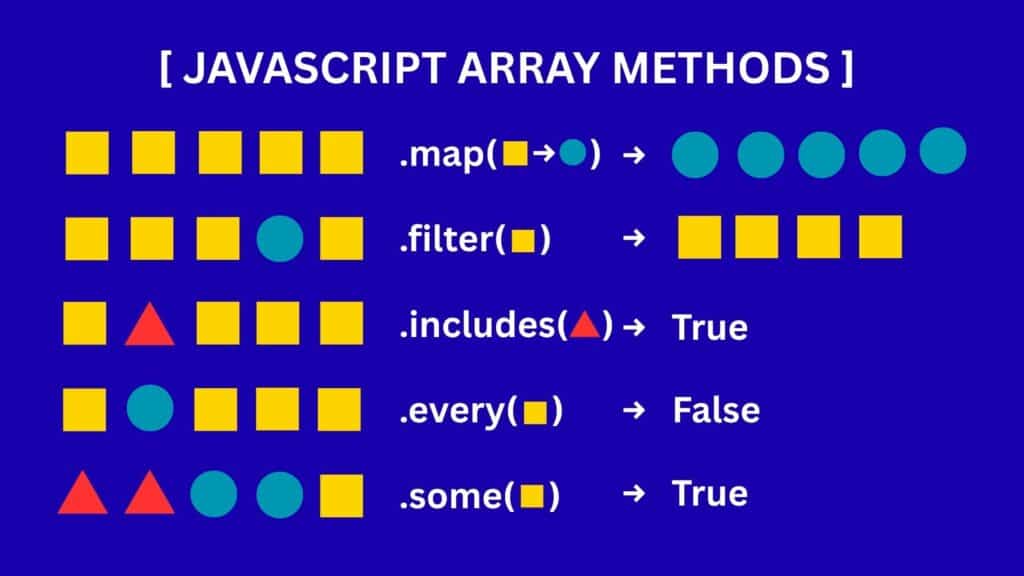
Map transform every item. This is my most-used array method.
Just like the traditional loop, it iterates over each element in the original array
The key difference is that with modern array methods like map, you don’t need to manually set up a counter variable, write the loop condition, increment it each time, or access values by index—the method handles all of that for you
const items = [1, 2, 3, 4, 5];

const transformedItems = items.map(item => /*define the transformation logic here*/ );Map gives you each item in the array one by one, starting from the first until the last. All you need to do is decide how you want to change or transform each item along the way.
The syntax is cleaner and protects you from common mistakes—like referencing the wrong variables or writing incorrect expressions—that often occur with traditional loops.
A map can be used in the following cases:
a. Transforming Data
When working with API responses, you can use map to reshape the data into a format that fits your needs. This is especially useful when the structure returned by the API doesn’t match the interface expected by your components or UI methods
/** Example API Response (raw data) **/
const apiResponse = [
  {
    user_id: 101,
    full_name: "Alice Johnson",
    account: { status: "active" }
  },
  {
    user_id: 102,
    full_name: "Bob Smith",
    account: { status: "inactive" }
  }
];To display a list of users from this API response, you can use a map to transform the data into a usable format.
user_id -> idfull_name -> namestatus -> isActive
const users = apiResponse.map(user => ({
  id: user.user_id,
  name: user.full_name,
  isActive: user.account.status === "active"
}));

console.log(users);
// [
//   { id: 101, name: "Alice Johnson", isActive: true },
//   { id: 102, name: "Bob Smith", isActive: false }
// ]After this transformation, you can pass it to <UserList /> the component
function UserCard({ user }) {
  return (
    <div style={{ marginBottom: "10px" }}>
      <h3>{user.name}</h3>
      <p>Status: {user.isActive ? "✅ Active" : "❌ Inactive"}</p>
    </div>
  );
}

function UserList({ users }) {
  return (
    <div>
      {users.map(u => (
        <UserCard key={u.id} user={u} />
      ))}
    </div>
  );
}

// Using the transformed data
<UserList users={users} />;b. Extracting Specific Properties
The map also allows you to extract specific properties. Let’s say you want to display the list of names. You can use a map to remove the unnecessary property named id.
  const users = [
    { id: 1, name: 'Alice' },
    { id: 2, name: 'Bob' },
    { id: 3, name: 'Charlie' }
  ];
  const userNames = users.map(user => user.name);
// userNames will be ['Alice', 'Bob', 'Charlie']c. Formatting Data
You can also use a map to format data. In here, we concatenate the first name and full name
const users = [
  { firstName: "John", lastName: "Doe" },
  { firstName: "Jane", lastName: "Smith" },
  { firstName: "Sam", lastName: "Wilson" }
];

const fullNames = users.map(user => `${user.firstName} ${user.lastName}`);

console.log(fullNames);
// Output: ["John Doe", "Jane Smith", "Sam Wilson"]Remember, map() only transforms each element in the array—it doesn’t add or remove items. So, if you start with 10 elements, you’ll always get back 10 elements (just in a new form).
Transform can mean things like:
- Adding a new property with a derived value
- Removing a property you don’t need
- Updating the value of an existing property
- Converting a simple string into an object
- Changing a number into a string
- Restructuring the item into nested objects or arrays
2. Filter
As the name suggests, filter() selects items from an array based on a given condition. It keeps only the elements that satisfy the condition and removes the rest.
Here are some common use cases of filter():
a. Removing items
Classic example of that is when the user selected an IDs. These IDs will indicate the items that will be deleted
// Original list of items
const items = [
  { id: 1, name: "File A" },
  { id: 2, name: "File B" },
  { id: 3, name: "File C" }
];

// ID selected by the user for deletion
const idToDelete = 2;

// Use filter to remove only the item with id = 2
const remainingItems = items.filter(item => item.id !== idToDelete);

console.log(remainingItems);
// Output:
// [
//   { id: 1, name: "File A" },
//   { id: 3, name: "File C" }
// ]b. Retrieved by Status
It is useful when you want to show something based on a certain status
// Example list of tasks
const tasks = [
  { id: 1, title: "Fix bug", status: "done" },
  { id: 2, title: "Write docs", status: "in-progress" },
  { id: 3, title: "Deploy app", status: "pending" },
  { id: 4, title: "Code review", status: "done" }
];

// Filter tasks that are already completed
const completedTasks = tasks.filter(task => task.status === "done");

console.log(completedTasks);
// Output:
// [
//   { id: 1, title: "Fix bug", status: "done" },
//   { id: 4, title: "Code review", status: "done" }
// ]c. Searching
Returned all items that matched the query
const fruits = ["apple", "banana", "cherry", "grape", "pineapple"];

// User's search query
const search = "ap";

// Filter fruits that start with "ap"
const results = fruits.filter(fruit =>
  fruit.toLowerCase().startsWith(search.toLowerCase())
);

console.log(results);
// Output: ["apple"]d. Data Cleaning
When you want to remove falsy values like null, undefined, "", or 0 to ensure that you only have the valid items
const rawData = ["apple", null, "", "banana", undefined, "cherry", 0, "grape"];

const cleanedData = rawData.filter(Boolean);

console.log(cleanedData);
// Output: ["apple", "banana", "cherry", "grape"]3. Includes
Includes is best used when we want to invoke some logic based on an item. That item could be a currently selected page, current role, selected option from the dropdown, or typed text
a. Search / Filtering
Same with filter, you can also use includes in filtering. If you have an e-commerce app you can use includes to check if the product name contains the user’s search keyword
const products = ["Laptop", "Tablet", "Phone"];
const search = "lap";

const results = products.filter(p => p.toLowerCase().includes(search.toLowerCase()));
console.log(results); // ["Laptop"]b. Navigation/Routing
For example, if we want to do something when we’re on a certain page
// Suppose the current URL is: https://example.com/dashboard/settings
const currentPath = window.location.pathname;

if (currentPath.includes("/dashboard")) {
  console.log("Do something in dashboard page");
}

if (currentPath.includes("/settings")) {
  console.log("Do something in settings page");
}c. Role-Based Access Control
Checking if your current role is in the whitelist then do some action if true
const allowedRoles = ["admin", "editor"];
const userRole = "viewer";

if (!allowedRoles.includes(userRole)) {
  console.log("Access denied");
}d. Selection
Execute logic based on the user’s selected option.
For example, imagine a listbox with the options:
- All
- Item 1
- Item 2
- Item 3
We can use .includes() to check whether the selected options contain “All”.
- If All is included, return the full list of items.
- If not, return only the specifically selected items.
e. Form Validation
To check if the typed email includes @
const email = "user@example.com";
if (!email.includes("@")) {
  console.log("❌ Invalid email");
}f. Auto Suggestion
An example is similar to Grammarly. Imagine you want to highlight “weak” words like very or really so you can suggest stronger alternatives.
const text = "This is a very important message.";
const weakWord = "very";

if (text.toLowerCase().includes(weakWord)) {
  console.log(`⚠️ Consider removing or replacing "${weakWord}" for stronger writing.`);
}g. Content Moderation
In chat/social apps: block messages containing banned words.
const banned = ["spam", "scam"];
const message = "This is a spam offer";

if (banned.some(word => message.toLowerCase().includes(word))) {
  console.log("🚫 Message blocked");
}4. Every
Every is a method that returns true if all items match the condition
a. Validation
If you want to check if all fields in a form are not empty before you submit it
const requiredFields = ["name", "email", "password"];
const form = { name: "John", email: "john@mail.com", password: "1234" };

const readyToSubmit = requiredFields.every(f => form[f]?.trim() !== "");
console.log(readyToSubmit); // trueor ensure there’s enough stock before you checkout
const cart = [
  { id: 1, name: "Laptop", inStock: true },
  { id: 2, name: "Mouse", inStock: true }
];

if (cart.every(item => item.inStock)) {
  console.log("✅ Proceed to checkout");
}5. Some
Some is a method that returns true if some items match the condition
a. Detection
In banking, if you want to check if there’s any suspicious pattern
const checks = [
  { rule: "Large Amount", triggered: false },
  { rule: "Foreign Location", triggered: true },
  { rule: "Odd Hours", triggered: false }
];

const possibleFraud = checks.some(c => c.triggered);
console.log(possibleFraud); // true6. Array methods features
a. Immutable
The beauty of these methods, especially the map and filter They returned a new array instead of modifying an existing one, avoiding potential bugs due to side effects. With a traditional loop
The mutability depends on how you write it.
Immutable Map
You create a new array instead of modifying the original.
const numbers = [1, 2, 3];
const doubled = [];

for (let i = 0; i < numbers.length; i++) {
  doubled.push(numbers[i] * 2);
}

console.log(doubled);  // [2, 4, 6]
console.log(numbers); // [1, 2, 3] → original unchangedHere the loop behaves like map() → immutable
Mutable Map
You modify the original array directly inside the loop.
const numbers = [1, 2, 3];

for (let i = 0; i < numbers.length; i++) {
  numbers[i] = numbers[i] * 2;
}

console.log(numbers); // [2, 4, 6] → original changedHere, the loop is mutable because it directly updates the original array.
Keep in mind that .includes(), .every() and .some() are inherently immutable because they all return a boolean
b. Chainable
.map() and .filter() are chainable.
Instead of writing multiple loops or temporary variables, you can express logic step by step in a pipeline.
const result = [1, 2, 3, 4, 5]
  .filter(n => n % 2 === 0)   // keep even numbers
  .map(n => n * 10);          // multiply them by 10
// result = [20, 40]which difficult to achieve when using the traditional for loop
c. Declarative
With traditional for loops, the code is imperative—you have to spell out each step, which can make the intent harder to see. Modern JavaScript methods, on the other hand, are declarative: instead of detailing how to achieve the result, you simply describe what you want.
Key Takeaway
Modern JavaScript array methods like map, filter, includes, every, and some simplify code, reduce errors, and improve readability. Unlike traditional loops, they’re immutable, often chainable, and let you express intent clearly—making everyday coding faster, cleaner, and more reliable.