Hardcoding is not scalable
When things are changing hard coded values becomes a burden—especially across hundreds of requests—because you need to edit them all over the place it is slow and error-prone with variable you only need to edit them in one place.
Here’s the trade-off: storing all values in variables makes them easier to maintain, which is great—but it also creates a risk. Since variables can be accessed widely, unintended changes may occur.
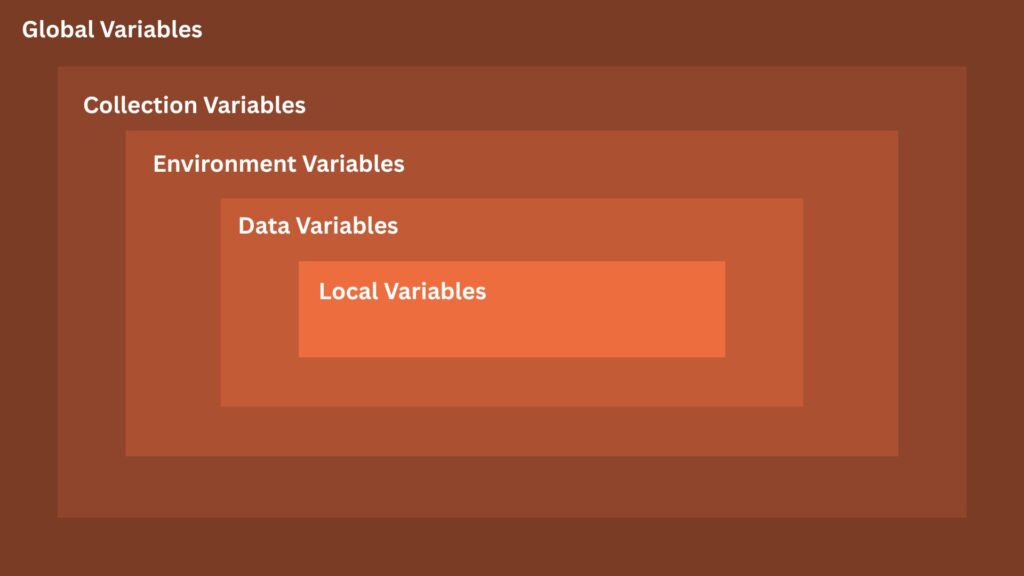
To address this, Postman introduced variable scopes. By choosing the right scope for the right purpose, you can balance flexibility with control and reduce the chance of unwanted side effects.
1. Global Variables
Global variables is variable that is accessible everywhere. If you always see that same value in many requests across collections and environments this might be a global variable. Most of the global variables are the defaults that rarely change.
Example of that is the pagination limit, which defines how many records are returned per request.
https://api.example.com/products?page=2&per_page={{page_limit}}Since all endpoints are using pagination if you intend to change the default pagination limit you only need to do it in one place. No need go through each requests and manually edit them
2. Collection Variables
This type of variable allow you to shared values to all requests within the collection.
Use Case:
When testing a feature, it often takes a series of requests working together.
Many times, the response from the first request is needed in the path params, query params, headers, or body of the next requests.
To handle this, you can save the value from the first request into a collection variable pm.collectionVariables.set(key, value)
Then reuse it in later requests.
You can use it programmatically like this inside the test scripts pm.collectionVariables.get(key) or using {{ key }} when accessing it in postman UI (e.g., path params, query params, headers and body)
3. Environment Variables
The line between global and environment variables is thin. You can’t tell much the difference both variables either in global and environment are accessible everywhere.
To tell the difference ask yourself
- Will this value need to be change if I switch to different environment? If no, it is a global variable
Example of values that need to change when switching to different environment base URL and api version.
- Base URL – If the dev server is down, you may need to switch to another environment (like test or staging) so you can keep working. With hundreds of endpoints, manually changing
dev-api.example.comtotest-api.example.comwould be slow and tedious. Environment variables make this switch quick and easy. - API Version – When big database changes happen, APIs are often versioned (v1, v2, etc.) to avoid breaking production. This lets you test v1 in one environment and v2 in another
4. Data Variables
Data variables are loaded from external CSV or JSON files in the Collection Runner. They’re used for data-driven testing with multiple inputs.
username,password,expectedStatus
user1@example.com,Password123,200
user2@example.com,WrongPass,401
user3@example.com,Password456,200
user4@example.com,,400How this works:
username→ maps to{{username}}in your request body.password→ maps to{{password}}.expectedStatus→ can be used in test scripts to assert the response code.
Example JSON body in Postman:
{
  "username": "{{username}}",
  "password": "{{password}}"
}Example test script:
pm.test("Status code matches expected", function () {
    pm.response.to.have.status(parseInt(pm.iterationData.get("expectedStatus")));
});This way, Postman will loop through each row in the CSV and test your API with different inputs.
5. Local Variables
Local variables in Postman are temporary and exist only during a single request run.
You might wonder—why use them instead of normal JavaScript variables (var, let, const)? The difference is scope. JavaScript variables only work inside the script where they’re defined, while local variables can be used in URLs, headers, or bodies.
Local variables also let you:
- Share data between the pre-request and test scripts of the same request.
- Temporarily override environment, collection, or global variables without changing them permanently.
pm.variables.set("authToken", "12345");6. Dynamic Variables
Dynamic variables are built-in Postman variables that generate random values. They’re useful when you need unique or mock data for testing.
{{$guid}}       // random GUID
{{$timestamp}}  // current UNIX timestamp
{{$randomInt}} // random integerKey Takeaway
Understanding Postman variables is essential for faster, more reliable API testing—something that’s difficult to achieve without them. They cut down on repetitive manual edits, reduce errors, make environment switching effortless, and let you test grouped endpoints that represent real functionality.
Variables also unlock advanced testing. You can use datasets to simulate real scenarios when basic testing isn’t enough, and take advantage of Postman’s built-in variables for extra convenience—without needing to reinvent the wheel.