


In this blog post, I’ll share the technique that I used to overcome the barrier when doing unit testing
Table of Contents
Our team has a practice of adding unit tests every time we write code, so that if a new feature introduces a bug in the future, we can quickly detect and fix it
There was a time when I was about to add unit tests for some code I had written. The code seemed simple, and I was confident that writing tests would be easy. However, as I reviewed the surrounding code and started brainstorming how to test it, I realized I had run into a testing barrier.
I realized in order to test this piece of code, I need to mock the entire component. What makes it difficult this component might have many moving pieces tangled together
- too many state
- too many hooks
- too many components
During this time I was thinking if I continue adding the unit tests for a simple code that I had written it will not worth it because it so simple but the amount of time it will take is too much because I need to deal with complicated mock of the entire component plus the custom hook inside.
After several sprints, I reviewed the source code an I found a way that will make adding unit tests easier and that’s what I’m going to share with you
Test Barrier
it’s when a piece of code is so tightly intertwined with a larger component that testing it in isolation feels impossible.
To better imagine this, let’s say we have this page and your goal is to add a unit tests
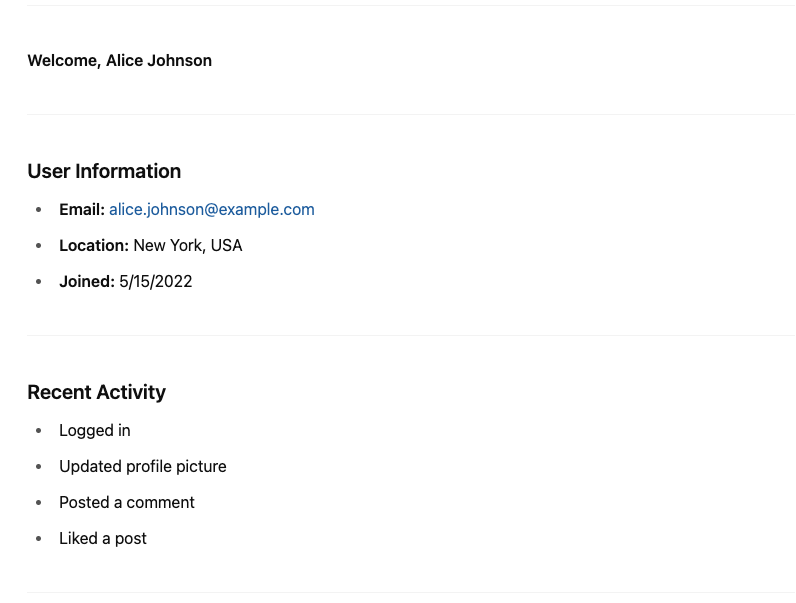
Sign and Symptoms
Inline code is code placed directly inside another block or structure. Notice the User Info and Activity Feed
import React from 'react';

const UserProfilePage = ({ user }) => {
  return (
    <div style={{ padding: '20px' }}>
      <h1>Welcome, {user.name || 'Guest'}</h1>

      {/* User Info Inline */}
      <div style={{ border: '1px solid #ccc', padding: '10px', marginBottom: '20px' }}>
        <h2>User Information</h2>
        {user.email && <p><strong>Email:</strong> {user.email}</p>}
        {user.location && <p><strong>Location:</strong> {user.location}</p>}
        {user.joinedDate ? (
          <p><strong>Joined:</strong> {new Date(user.joinedDate).toLocaleDateString()}</p>
        ) : (
          <p><strong>Joined:</strong> Not available</p>
        )}
      </div>

      {/* Activity Feed */}
      <div style={{ border: '1px solid #ccc', padding: '10px' }}>
        <h2>Recent Activity</h2>
        {user.activities && user.activities.length > 0 ? (
          <ul>
            {user.activities.map((activity, index) => (
              <li key={index}>{activity}</li>
            ))}
          </ul>
        ) : (
          <p>No recent activity.</p>
        )}
      </div>
    </div>
  );
};

export default UserProfilePage;
Reasons for the Problem
Instead of writing quick, focused tests, you end up in complex setups and mocks that drain your time and patience.
Treatment
Extract the code into a separate component
Create a component named UserInfoCard.js
import React from 'react';

const UserInfoCard = ({ email, location, joinedDate }) => {
  return (
    <div
      style={{
        border: '1px solid #ccc',
        padding: '10px',
        marginBottom: '20px',
      }}
    >
      <h2>User Information</h2>
      {email && (
        <p>
          <strong>Email:</strong> {email}
        </p>
      )}
      {location && (
        <p>
          <strong>Location:</strong> {location}
        </p>
      )}
      {joinedDate ? (
        <p>
          <strong>Joined:</strong> {new Date(joinedDate).toLocaleDateString()}
        </p>
      ) : (
        <p>
          <strong>Joined:</strong> Not available
        </p>
      )}
    </div>
  );
};

export default UserInfoCard;
Create a second component named UserActivityFeed.js
import React from 'react';

const UserActivityFeed = ({ activities }) => {
  return (
    <div
      style={{
        border: '1px solid #ccc',
        padding: '10px',
      }}
    >
      <h2>Recent Activity</h2>
      {activities && activities.length > 0 ? (
        <ul>
          {activities.map((activity, index) => (
            <li key={index}>{activity}</li>
          ))}
        </ul>
      ) : (
        <p>No recent activity.</p>
      )}
    </div>
  );
};

export default UserActivityFeed;
In the main file named UserProfilePage.js
you can use the two components like this
import React from 'react';
import UserInfoCard from './UserInfoCard';
import UserActivityFeed from './UserActivityFeed';

const UserProfilePage = ({ user }) => {
  return (
    <div style={{ padding: '20px' }}>
      <h1>Welcome, {user.name || 'Guest'}</h1>

      <UserInfoCard
        email={user.email}
        location={user.location}
        joinedDate={user.joinedDate}
      />

      <UserActivityFeed activities={user.activities} />
    </div>
  );
};

export default UserProfilePage;
Benefits
You can add test more easily since you are focus to a small part of the component
Example test for UserInfoCard.test.js
// UserInfoCard.test.js
import React from 'react';
import { render, screen } from '@testing-library/react';
import UserInfoCard from './UserInfoCard';

describe('UserInfoCard', () => {
  test('renders all user info fields correctly', () => {
    render(
      <UserInfoCard
        email="user@example.com"
        location="New York"
        joinedDate="2023-01-01T00:00:00Z"
      />
    );

    expect(screen.getByText(/email/i)).toBeInTheDocument();
    expect(screen.getByText('user@example.com')).toBeInTheDocument();

    expect(screen.getByText(/location/i)).toBeInTheDocument();
    expect(screen.getByText('New York')).toBeInTheDocument();

    expect(screen.getByText(/joined/i)).toBeInTheDocument();
    expect(screen.getByText('1/1/2023')).toBeInTheDocument();
  });

  test('does not render email and location if not provided', () => {
    render(<UserInfoCard joinedDate="2023-01-01T00:00:00Z" />);

    expect(screen.queryByText(/email/i)).not.toBeInTheDocument();
    expect(screen.queryByText(/location/i)).not.toBeInTheDocument();

    expect(screen.getByText(/joined/i)).toBeInTheDocument();
  });

  test('shows "Not available" when joinedDate is missing', () => {
    render(<UserInfoCard email="test@example.com" location="LA" />);

    expect(screen.getByText(/joined/i)).toBeInTheDocument();
    expect(screen.getByText(/not available/i)).toBeInTheDocument();
  });
});
Example test for UserActivityFeed.test.js
// UserActivityFeed.test.js
import React from 'react';
import { render, screen } from '@testing-library/react';
import UserActivityFeed from './UserActivityFeed';

describe('UserActivityFeed', () => {
  test('renders list of activities', () => {
    const activities = ['Logged in', 'Posted a comment', 'Liked a post'];

    render(<UserActivityFeed activities={activities} />);

    expect(screen.getByText(/recent activity/i)).toBeInTheDocument();

    activities.forEach(activity => {
      expect(screen.getByText(activity)).toBeInTheDocument();
    });
  });

  test('renders "No recent activity." when activities list is empty', () => {
    render(<UserActivityFeed activities={[]} />);
    expect(screen.getByText(/no recent activity/i)).toBeInTheDocument();
  });

  test('renders "No recent activity." when activities is undefined', () => {
    render(<UserActivityFeed />);
    expect(screen.getByText(/no recent activity/i)).toBeInTheDocument();
  });
});
Note that in real world, UserProfilePage can be more complicated it might have a lots of props and custom hooks
Final Thoughts
By converting inline code to a separate component like UserInfoCard and UserActivityFeed. You can create a focus unit tests easily without thinking the entire UserProfilePage component that might cost you more time because of the complexity of creating a mock