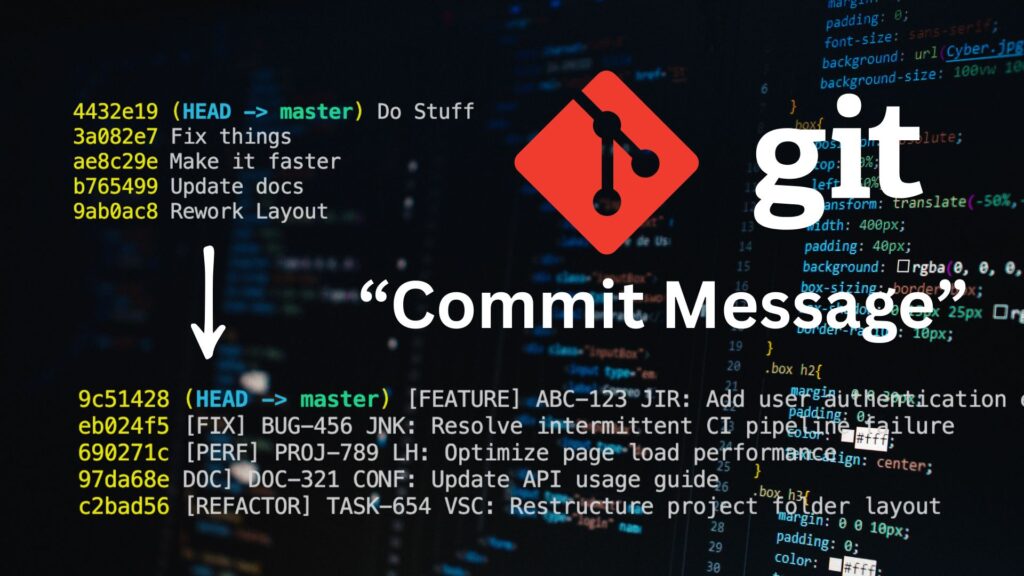
In this blog post, I’ll share what are the 3 things I include in a commit message that others don’t. I believe that having a meaningful commit message makes you an efficient developer
Table of Contents
When I first started using Git, whenever I made code changes, I committed them and used a vague message similar to this
git commit -m "Updated code"Over time, it would look like this
git log

f84df2a "Update code"
1ad19bf "Deleting again"
8d82204 "Fix bugs"And based on my experience, it is unhelpful
Change Type
When adding a new feature, sometimes we don’t just have code that makes up the feature. Most of the time, we add other types of code changes, and these other types, which are not critical to the feature, consume most of our time during code review.
We added details about the type of changes in each commit—something others omit from their messages.
| Change Type | Git Command | Description |
|---|---|---|
| FEATURE | git commit -m “[FEATURE] …” | Use when introducing a new feature to the codebase. |
| REFACTOR | git commit -m “[REFACTOR] …” | Use for code changes that neither fix a bug nor add a feature, such as restructuring code. |
| TEST | git commit -m “[TEST] …” | Use when adding or modifying tests. |
| FIX | git commit -m “[FIX] …” | Use when fixing a bug in the codebase. |
| IMPROVEMENT | git commit -m “[IMPROVEMENT] …” | Use when improving an existing feature |
| DOC | git commit -m “[DOC] …” | Use when writing or updating documentation. |
We have six change-type categories—add more if needed, as long as everyone agrees on their definitions
Here is what git log Looks like when you add the change type
Example: For a pull request to add a new feature
git log
[FEATURE] ... <- Focus on this
[TEST] ... <- Less focus on this
[REFACTOR] ... <- Less focus on this
[FEATURE] ... <- Focus on this
[DOC] ... <- Less focus on thisExample: For a pull request to resolve a bug
git log
[DOC] ... <- Less focus on this
[FIX] ... <- Focus on this
[TEST] ...<- Less focus on this
[TEST] ...<- Less focus on this(1) On this approach, the code reviewer can efficiently use his precious attention to the commit that is worth reviewing and less attention to the trivial changes
(2) Separating different changes makes your commit reusable. You can easily git cherry-pick the commit that is common for two branches because you are sure that the commit only contains the necessary changes
(3) Lastly, as a bonus, you can easily tell the story of your commit history at a glance. It tells the coding style of the main developer: does he start from testing, then adding a feature, or does he start refactoring before adding a feature? which is not possible if you mix up all of your changes in one commit
Ticket ID
In a large team, each developer has their part on the codebase, but unfortunately, changes happen
Sometimes you need to take over a part that another developer previously wrote, and that developer might not be available, perhaps they have moved to a higher position, a new team, a project, or a company.
Did you know that linking the ticket ID to a commit will make it even more useful?
Before any line of code is ever written, it all starts with a ticket. Think of that ticket as the founding document—it carries everything you’d ever want to know about the work.
A well-crafted ticket answers all the top questions:
- Who implemented the feature, its summary, context, and benefits?
- Who resolved the bug, its expected behavior, and actual behavior, including the steps to reproduce it?
- Who and when was it tested?
- How many story points were assigned?
- What release version included it?
- What were the acceptance criteria?
- What related issues or code changes exist?
- What decisions shaped the final implementation?
- Was there any feedback before launch?
It’s like a mini audit trail—everything’s in one place for future reference. Want to trace where the code came from, how it evolved, and what context everyone had? The ticket’s got you covered.
git commit -m "[FEATURE] PAL-123 ..."There are two ways to utilize the ticket ID: Git Log-Driven vs Code-Driven
Git Log-Driven
If you already know the ticket, you can start by using git log --grep "PAL-123" With this command, you can easily filter out sets of changes related to PAL-123
git log --grep "PAL-123"
12dfv1 [FEATURE] PAL-123 ...
a2dk2d [TEST] PAL-123 ...
bdls2s [DOC] PAL-123 ...
sl9ke0 [FEATURE] PAL-123 ...To see all of the changes of these commits, use the -p flag
git log --grep "PAL-123" -pTo see the changes in an individual commit
git show a2dk2dThis is helpful if you want to review the code changes associated with a specific ticket ID, whether it is a feature, improvement, or bug fixes
Maybe you want to know how the other developer implemented a similar task, which you can repurpose for your current task, or just to verify if a new requirement being proposed was already implemented or not by the previous developer in the previous ticket
Code-Driven
You can use this approach even if you don’t know the ticket ID, but you know where to find the code in the codebase.
For example, if you want to review the context of “Add to Cart” functionality, the reason why it was implemented, and the expected behavior of that
You can globally search for the keyword “Add to Cart” and then view the file. You can hover over any line of code within that file that you think is related to the “Add to Cart.” Just make sure you’ve installed git essentials the VS Code extension
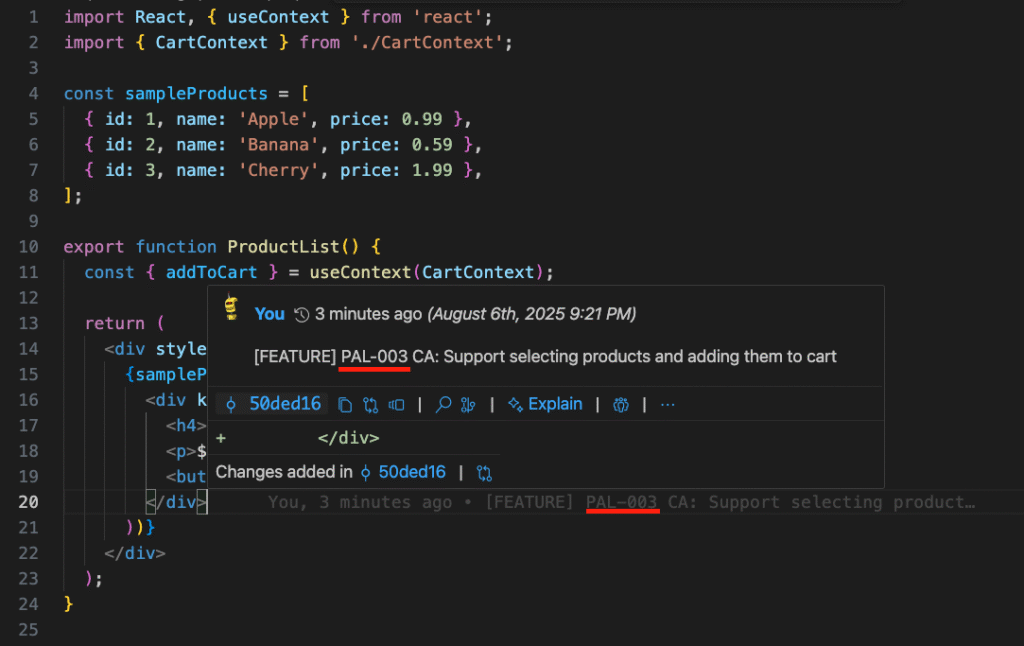
Then open the ticket ID in your issue management tool, which contains the context you need
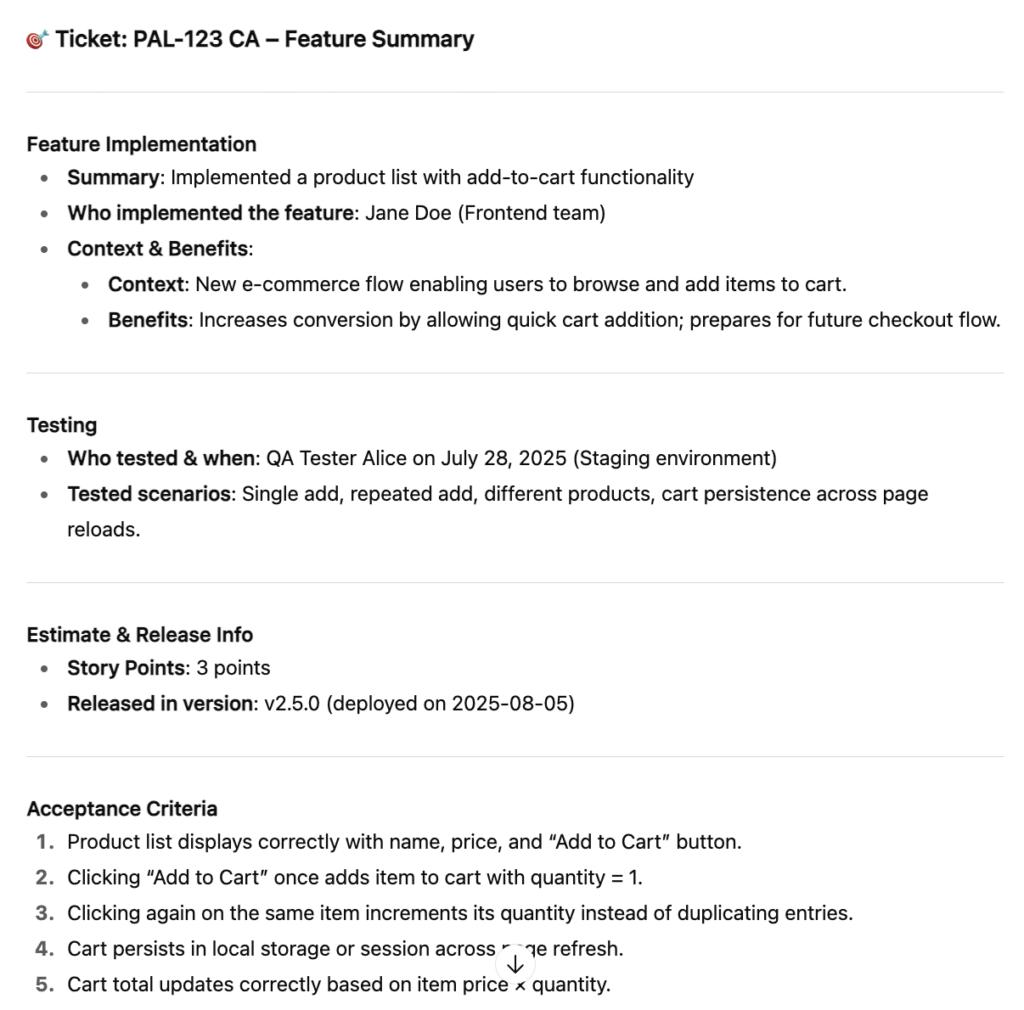
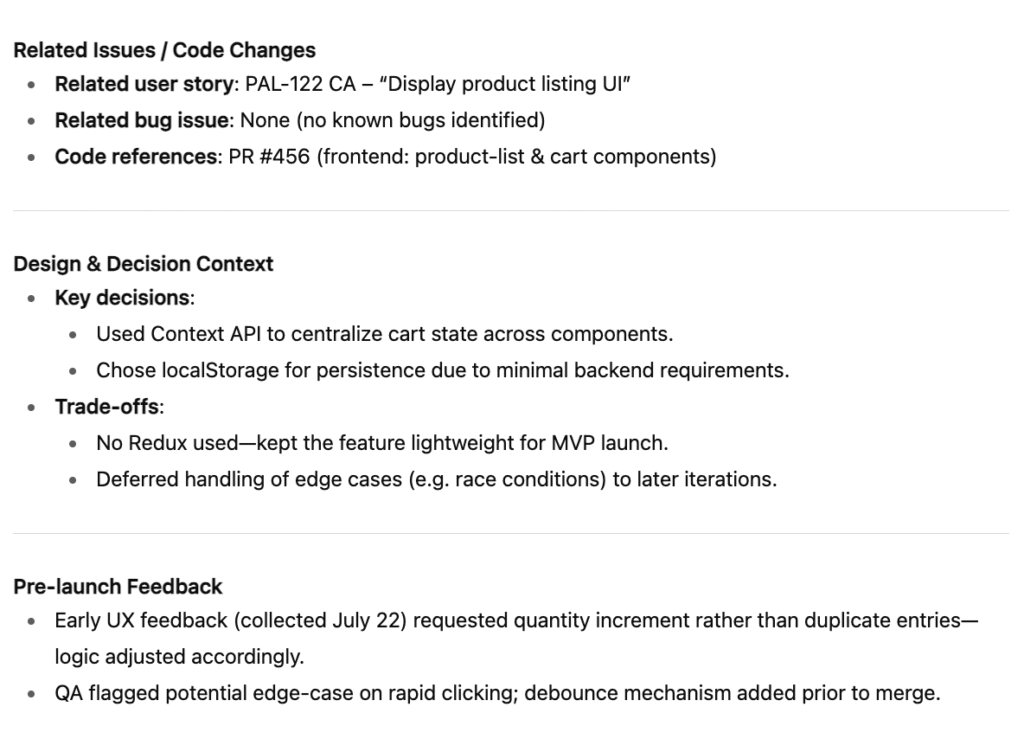
And that’s it, you can use the previous story points as a basis for a similar task in the future. You can use the context to understand the feature without manually reading the code.
In case you want to modify the code, you are aware which are the related issues that might be affected if you introduce new code changes.
You can verify if the bug originates from this issue by looking at the release date.
There are so many useful applications of this information; it’s up to you how to use it to speed up your planning, development, debugging, or documentation
Tool Name
When your app is broken down into multiple tools but hosted in one repository, you can add the tool name in the commit message.
Let’s say you have three tools, each has its abbreviation like TA, TB, TC, After the ticket ID, you can follow it with the tool name abbreviation and the summary title, like we usually do, separated by :
git commit -m "[FEATURE] PAL-003 TA: Support selecting products and adding them to cart"By including the tool name abbreviation, you can create an automated script that generates user release notes groups per tool. See the example below
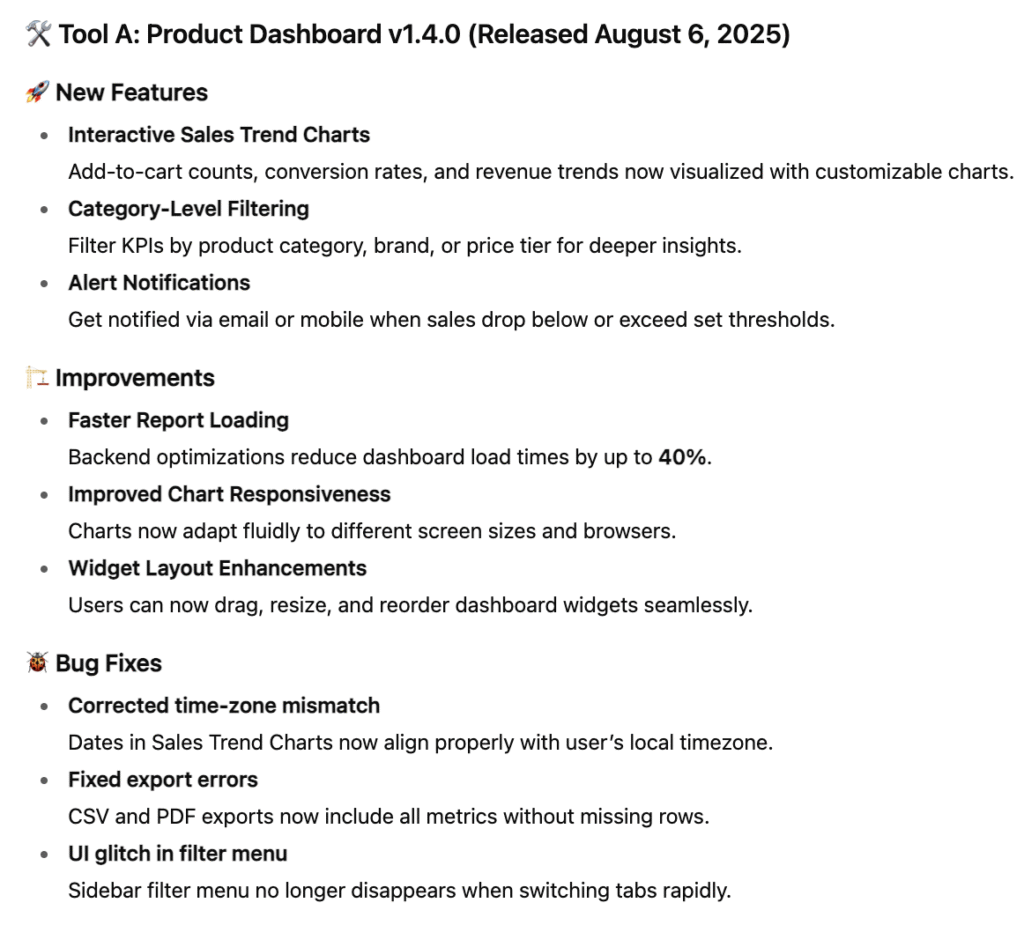
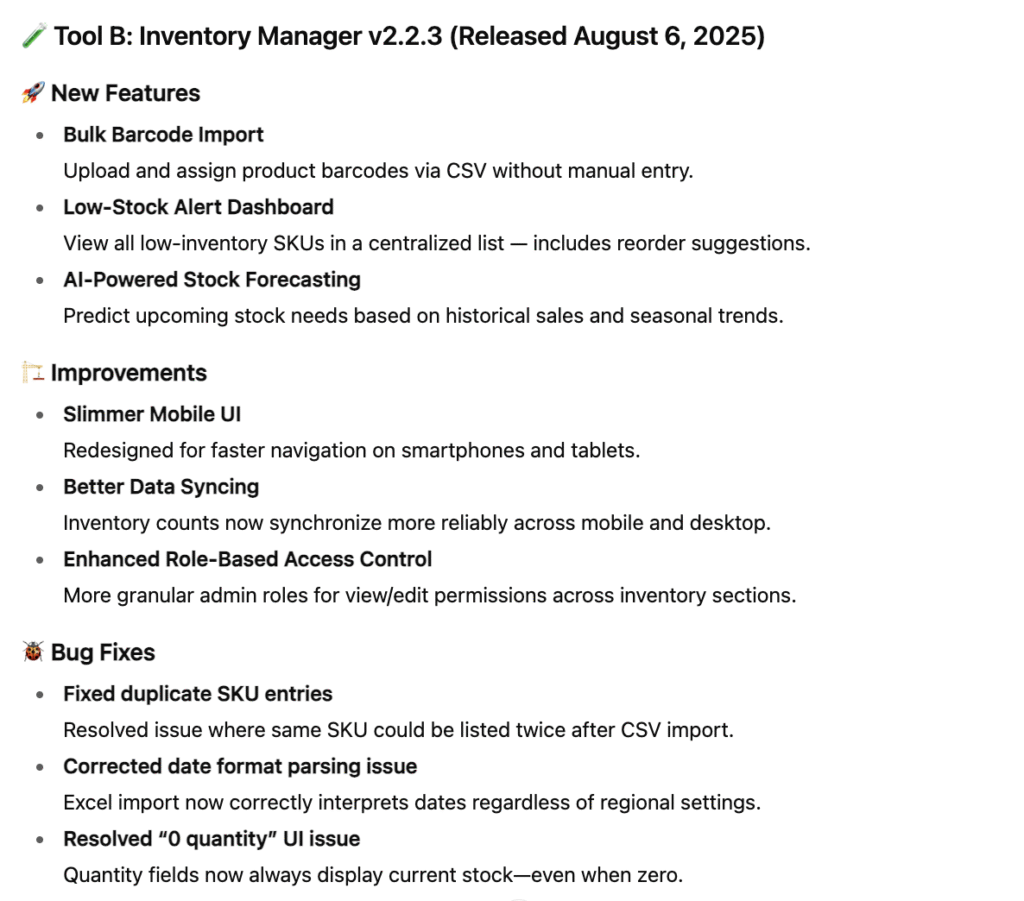
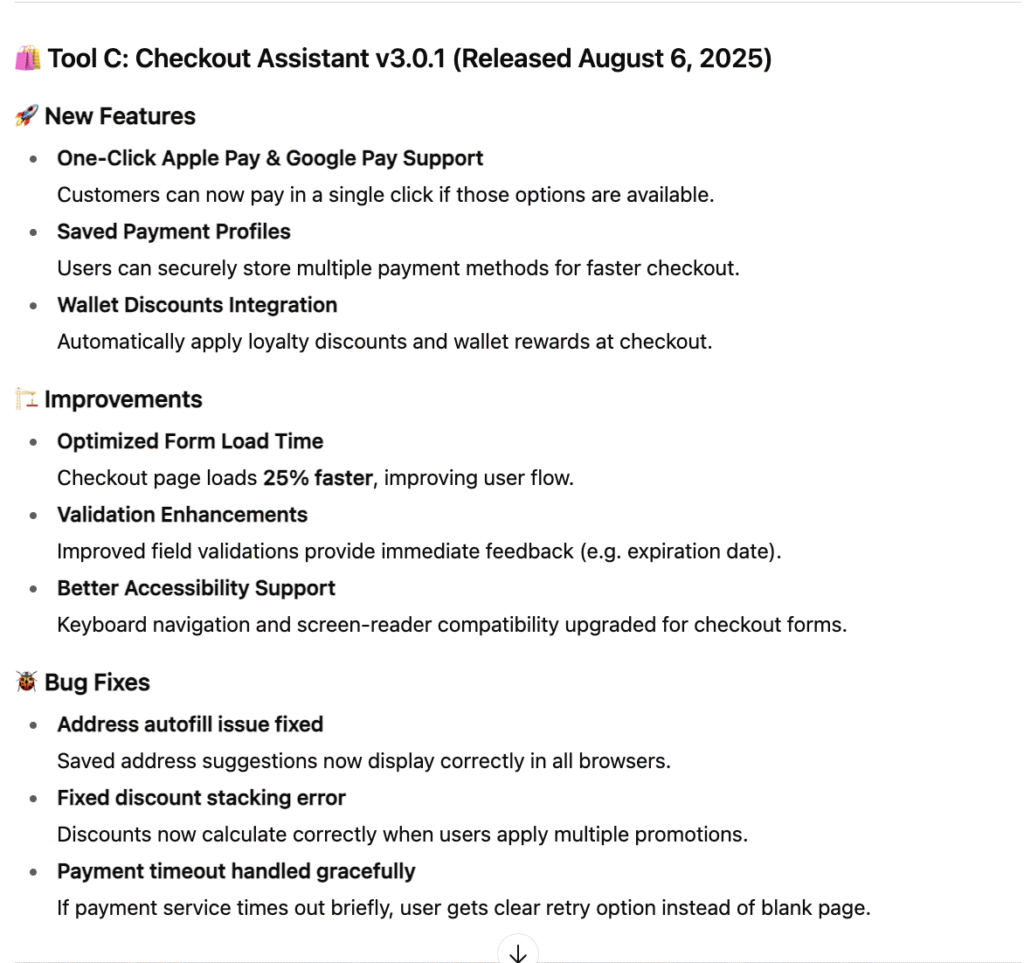
You can configure your scripts to skip refactoring or documentation commits, bundle all feature-related commits into a single aggregated “feature” commit, and include the detailed feature description in the commit body.
You can also build an automation script or Git hook that verifies whether specific issue IDs are present in commits or branch names—so you catch cases where tickets were accidentally skipped or work meant for one branch ended up in the wrong one.
Final Thoughts
Having this commit message template unlocks significant potential across Planning, Development, and Release. Knowing how to utilize this effectively will make you a more efficient developer.
[<CHANGE-TYPE>] <TICKET-ID> <TOOL-NAME>: Commit Summary
Commit BodyYou might disagree with me, but we cannot change the fact that this commit message template above is better than this
git log

f84df2a "Update code"
1ad19bf "Deleting again"
8d82204 "Fix bugs"You don’t have anything to lose by taking a few seconds to think of the change type, ticket ID, and tool name when committing, compared to manual creation of release notes, manually understanding how the code works, re-inventing the story points you had already estimated, you can’t cherry-pick and proceed to other task because all changes are mixed up and so on.
Please share this blog with your dev friends and colleagues if you find it useful, or leave a comment below if I missed something that you think might be helpful to other devs