At first, we set a fixed goal for every sprint—25 story points. Each team has a different speed, but for us, 25 was the number to hit.
Sounds easy, right? Well, not really.
By the end of the sprint, we saw we didn’t reach our target.
During retro, we found the reason: we forgot about real-world factors like:
- Shorter or longer sprint length
- Holidays
- Company events (team building, conferences, town halls)
- Different workloads or contracts
- Vacation and sick days
Skipping these made us fail. But tracking all of them manually each sprint was just too much.
That’s when our IT lead built a smart tool that handled it all.
Now sprint planning is simple. We just:
- Check the expected story points
- File vacation leaves ahead of time
The tool does the rest. Planning is now faster, clearer, and more accurate. We don’t waste time on backlog items that won’t fit the sprint. Adjustments are easy, and workload is shared fairly.
What started as a painful sprint turned into a smoother process.
It is called “The Team Workbook”
The tool itself is built on Google Sheets.
📥 Download The Team Workbook (Google Sheets)
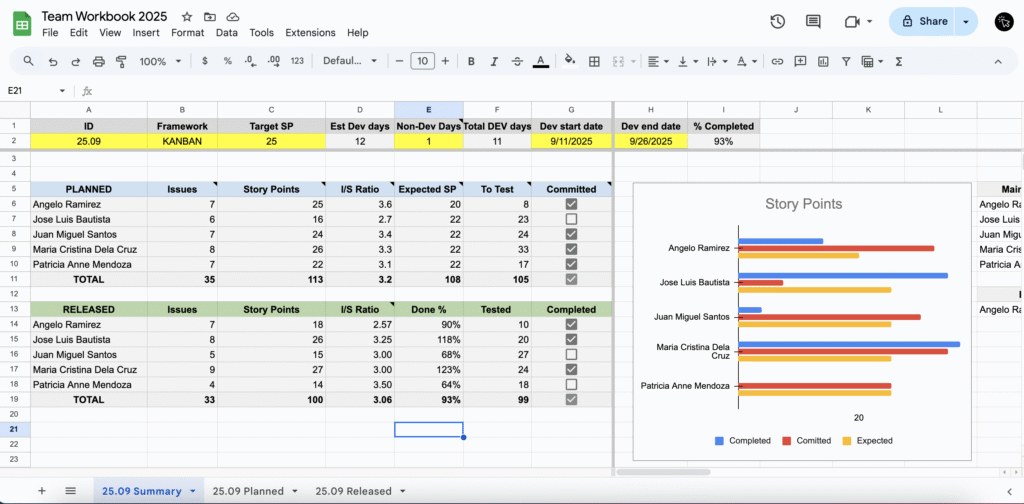
It’s made to track developer productivity—specifically, the story points completed in each sprint or kanban cycle.
Of course, every company measures success differently. Some care more about:
- Productivity and Delivery
- Code Quality
- Collaboration and Team Work
- Business Outcomes
That’s why organizations often use different sets of metrics.
But if your main focus is on productivity and delivery, this tool is more than enough.
How the tool works?
Sprint Planning
Step 1: Fill Out Team Info
This part is usually handled by your team leader.

- Yellow cells include: team ID, framework (Sprint or Kanban), target story points, non-DEV days (holidays, events), and sprint start/end dates.
Step 2: File Leaves
- Don’t forget: file your vacation or medical leave before the sprint starts. Otherwise, it will count as unplanned leaves.
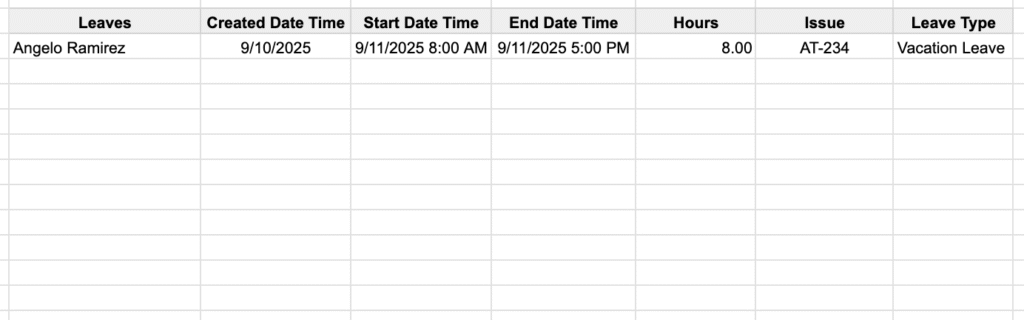
👉 Tip: You don’t have to do this manually—set up an automation to pull this info.
Step 3: Record FTE (Full-Time Equivalent)
- Add each team member’s FTE in the Contract column.
- If someone has extra tasks (like admin work or facilitation), adjust their workload in the Adjustment column.

Step 4: Let the Tool Do the Math
Based on the details above, the sheet will automatically calculate the expected story points for the sprint.
Step 5: Populate the Planned Tab
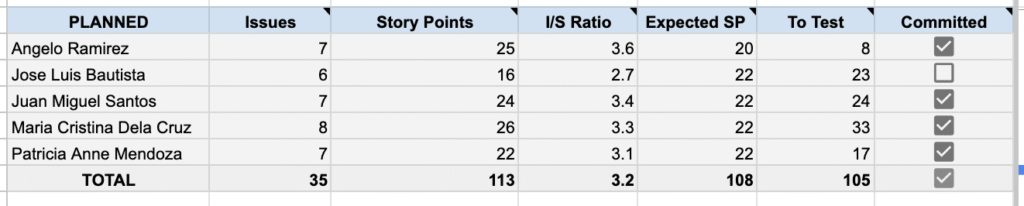
Two key pieces are still missing: issues and story points.
- Enter these in the Planned Tab.
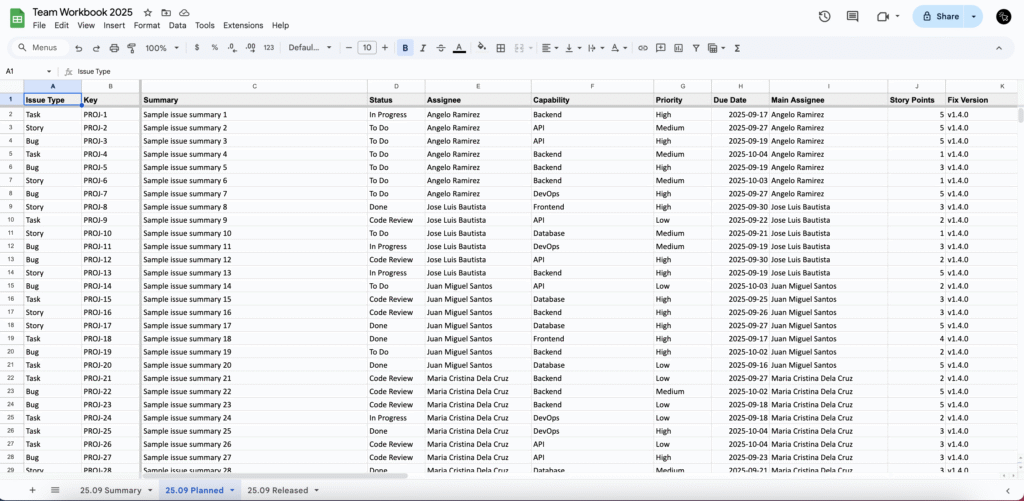
- Once filled, the numbers will appear in the Summary Tab > PLANNED SECTION

👉 Want to save time? Connect Jira to Google Sheets so this step updates automatically.
📺 Here’s a quick video tutorial: Watch on YouTube
Step 6: Plan Smarter
During sprint planning, you’ll compare actual story points vs. expected story points. From there, you might:
- Add more issues from the backlog
- Remove issues assigned to you
- Reassign issues to other devs
Use the Planned Tab to sort and decide quickly.
Step 7: Commit Fairly
Finally, make sure each developer has at least 80% of their expected story points covered.
Once they do, the ‘Committed’ checkbox will be marked.
Sprint Release
Step 1: Populate the Release Tab
In the Release Section, we need to get the number of release issues and their story points after the sprint development
- Enter these in the Release Tab.
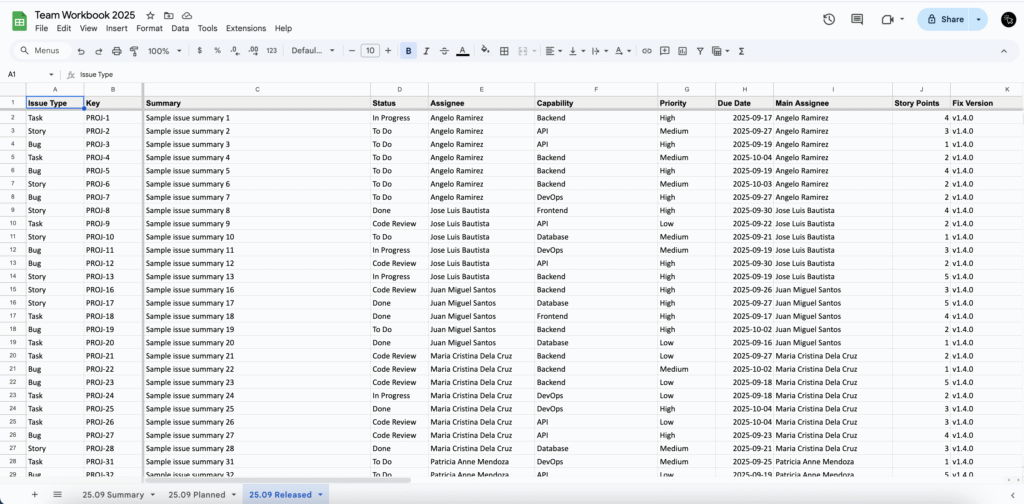
- Once filled, the numbers will appear in the Summary Tab > RELEASED SECTION

- Sprint: Done = release story points ÷ committed story points (with unplanned leaves factored in)
- Kanban: Done = release story points ÷ expected story points (with unplanned leaves factored in)
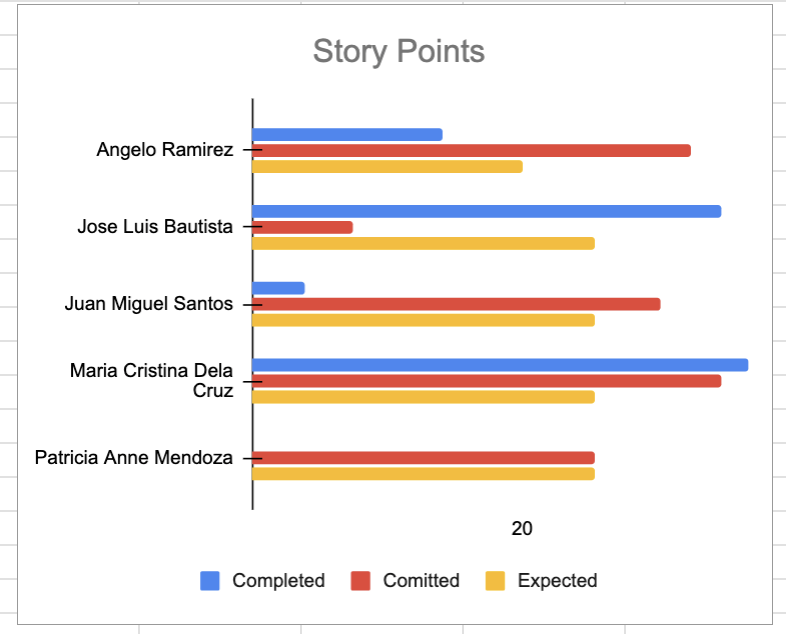
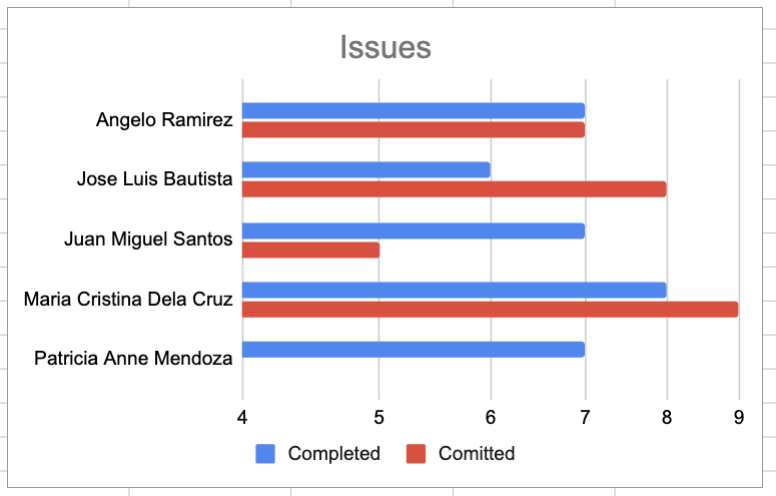
Step 2: Visualize the Completed, Committed and Expected Story Points
This visualization is helpful which you can use during sprint retrospective to reflect what happened during the development
Key Takeaway
Sprint planning fails when you ignore real-world factors like holidays, events, and unplanned leaves. By automating the calculations with The Team Workbook, you remove guesswork, save time, and make workload distribution more accurate and fair.
👉 Ready to plan smarter sprints?
📥 Download The Team Workbook (Google Sheets) and start making your sprint planning faster, clearer, and more predictable.